
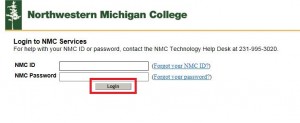
 So you need to Login to NMC Services, but when you hit the login button nothing happens, so you enter it again, still nothing happens. What should you do?
If you are trying to log in using the myNMC link and don’t receive either a “Login Failed, please try again,” indicating that either your NMC ID or password were entered incorrectly or receive the “Your account has been disabled due to intruder detection,” indicating that the account has been logged into incorrectly more than three times, you may have a problem with your browser or software on your system. Browsers with third party add-ons installed often interfere with proper credential exchanges during the authentication (login and password) process.
To test whether the browser is indeed the problem we can disable the add-ons to verify the problem.
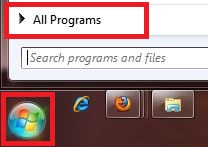
Click on the Windows Start button and select All Programs.
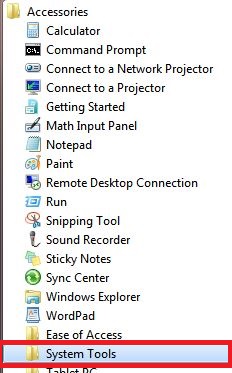
Select the Accessories folder.

Under the Accessories folder select System Tools.
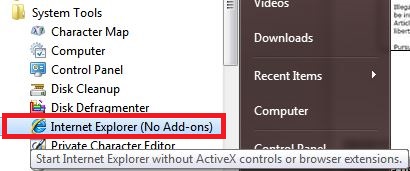
Click on Internet Explorer (No Add-ons).
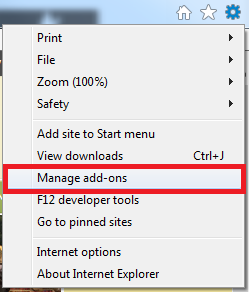
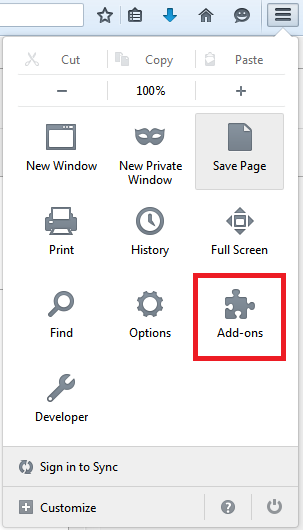
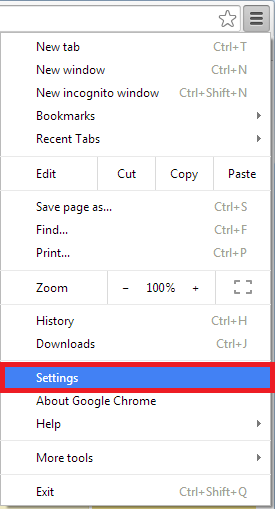
Attempt to Log in using the Internet Explorer (No Add-ons), in most cases the log in is successful confirming the presence of an add-on that is interfering with NMC login. The next step is to go into the settings of your browser and look for the presence of an add-on that is causing the problem. Usually it is related to a toolbar or software installation that installs an add-on to solicit advertising. The add-ons, also called extensions can be managed through the settings of the browser, available on the top right side of each browser (See below).
Internet Explorer –
Mozilla Firefox –
Google Chrome –
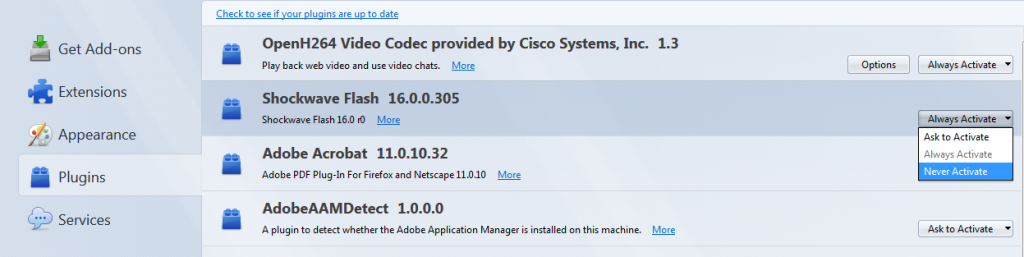
When viewing the add-ons, also called plug-ins or extensions, for a browser look for add-ons with suspicious names, in general most browsers will need to add-ons from Microsoft, Adobe, Flash, Google and Java to provide functionality to websites. Add-ons containing the words “Toolbar”, “Ad” or any other add-on that could be related to adware or malware is likely the culprit. It is common for software such as games downloaded off the internet to install these add-ons without knowledge of the user. Once you have identified possible malicious add-ons please disable them, restart to browser and attempt to log in to NMC Services.
If this doesn’t resolve the issue there may be a larger problem with the software or security settings on your machine.
For additional assistance please call the NMC Help Desk at (231) 995-3020 or www.nmc.edu/help.